


In some cases, respondents are unable or unwilling to complete a questionnaire. It can be useful to record this information so that these individuals can be excluded from the counts and/or are not contacted again for that particular survey. These reasons are also included in the export, allowing analysts to exclude them if needed.

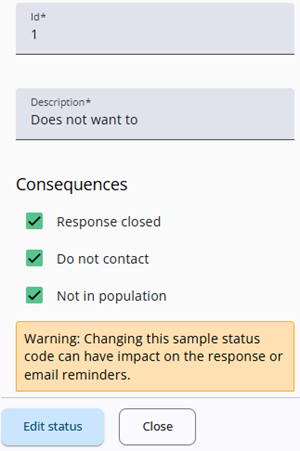
When adding or editing a sample status, it is possible to select several options.
Response closed: The response is closed, and the respondent will not receive any further reminders. However, it still counts as a valid response.
Do not contact: The respondent does not want to receive any further emails, but their response is still included in the results and counted as valid.
Not in population: This option can be used if the respondent is deceased or was not part of the target group. Their answers will be excluded from the total counts and results, as if they had never been approached.
Usage
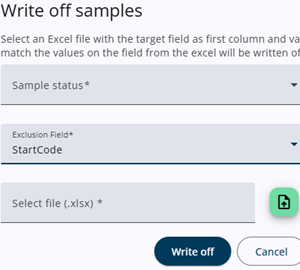
These sample statuses can be used in the Sample Management section of the Survey Admin. In the Sample Batches tab, a Write Off button is available. When this button is clicked, a window is opened in which one of the defined sample statuses can be selected, the field to be used as a key can be specified, and a sample file containing these keys can be uploaded.
If the selected Sample status had Not in population enabled then the number of samples shown in the Sample batch table will decrease.