


This article describes how to set the respondent’s default and available languages and how the respondent can switch between the different languages.
What is available
This section explains which languages are available to respondents. Availability is determined by the questionnaire settings, but the sample configuration can also influence the languages offered.
Languages defined on the questionnaire
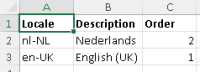
The languages available to respondents depend on those defined in the questionnaire. A language cannot be selected if it has not been configured. Instructions on how to set the questionnaire languages are provided here.
Languages hidden on the questionnaire
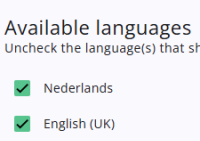
The content of one questionnaire can be copied and reused in another. However, the target questionnaire may not require all the languages defined in the source questionnaire. On the Translations tab in the Survey Editor, specific languages can be hidden if needed.
Languages defined on the sample
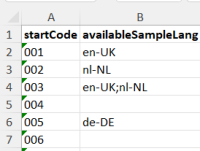
A questionnaire can include multiple languages, but it is not always necessary to show all of them to every respondent. Sometimes, only a subset of languages is needed. This can be set using availableSampleLang on the sample by entering the ISO-5 codes of the required languages, separated by a semicolon—for example: nl-NL;en-UK.
More information about special sample values can be found here.
What is shown to the respondent
This section explains what the respondent actually sees. It depends on the settings defined in the questionnaire and any choices the respondent may have made previously.
Enable the header
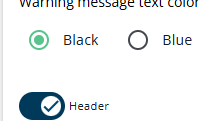
A dropdown with available languages can be displayed to respondents, but the Header option must be enabled in the questionnaire; otherwise, respondents will not be able to select a language. This setting can be adjusted on the Layout tab of the questionnaire.
Language in the URL

It is possible to specify the language in the link sent to the respondent using ?lang=en-UK for example.
This sets the default language for that respondent, but if other languages are available, the respondent can still switch if needed.
Change language in the browser
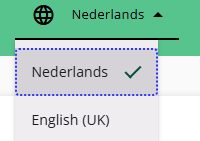
The respondent can change their preferred language using the dropdown, which shows only the available languages. The order of the languages is set by the order of the languages in the translations file. If the questionnaire is reopened in the same browser (not in incognito mode), the system will remember and reuse the last selected language.
Language stored in the browser (advanced)
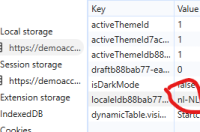
The questionnaire language is stored in the browser and is updated if the respondent changes it. If a link with a language parameter is opened, the previously chosen language is reused, as the browser value takes precedence. This does not apply if a different browser is used.