


Some sample values are treated differently. This may be due to privacy concerns, but other reasons are also possible. Additional context about these special columns is provided below.
startCode
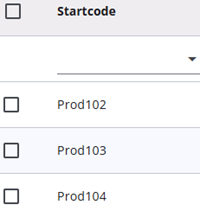
It is not required to include a column for startCode in the Excel file with samples; if it is omitted, the system will generate its own start codes. During the test phase, it is recommended to use draft start codes. When this sample type is selected, the start codes—whether generated by the system or provided in the Excel file—will be prefixed with DRAF.
For example, creating a startCode column with numbers 1 through 100 for testing purposes will result in start codes such as DRAF1, DRAF2, etc., which are easy to remember.
For production samples, if no startCode column is provided, the system will generate random start codes.
Email addresses can also be uploaded. If they are to be included, the column must be named Email. For privacy reasons, the values in this column are handled with extra care and are treated as Private variables, unlike other non-sensitive data, which are defined as Public variables.
PhoneNumber1 & PhoneNumber2
When contacting respondents via SMS, phone numbers must be entered in the designated columns. Phonenumber1 is used as the primary contact, and if it is invalid or not suitable, Phonenumber2 will be used as a backup.
Phone numbers must include the country code (for example, +31 for the Netherlands). The system checks that if a number is a valid mobile phone number based on the rules for the specified country.
For privacy reasons, phone numbers are treated as Private variables, just like email addresses, and are handled with extra care to ensure respondent confidentiality.
availableSampleLang
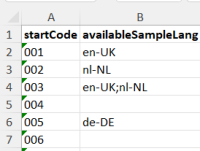
A questionnaire can include multiple languages, but it is not always necessary to show all of them to every respondent. Sometimes, only a subset of languages is needed. This can be set using availableSampleLang on the sample by entering the ISO-5 codes of the required languages, separated by a semicolon—for example: nl-NL;en-UK.
More information about the respondent’s languages can be found here.
validationCode
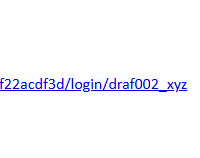
The start code is normally used to begin a questionnaire and is known only to the respondent. If multiple people use the same device, start codes from other respondents may appear in the browser history. To prevent this, validation codes are used. Respondents receive an email with a combined code (start code and validation code separated by an underscore) to enter in the start code field on the survey login page.
The validation code is removed when used and is not stored in the browser history. If a start code is entered without the validation code, an error is displayed.
Validation codes can be added to the samples. For testing, the column can be left empty, in which case no validation code is required
samplingGroup
This value can be useful when multiple samples need to be treated as a single result. For example, when both parents of a child are invited to answer the questionnaire and results from both are required. In the Response Overview module, this value can be used to determine whether all respondents in the sampling group have completed the questionnaire.
barcode
The documentation for barcode is under construction.