


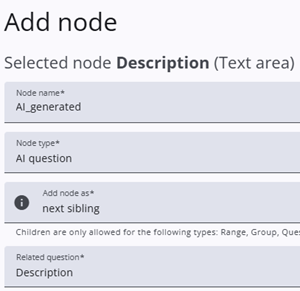
An AI question can be used to create a more personalised and relevant survey experience. The question is generated based on an earlier answer, allowing the survey to adapt to the respondent’s input.
To add an AI question, select the AI question node type from the dropdown menu. Then, select a question from the list of related text questions. The selected question is used to generate a relevant follow-up question based on the respondent’s answer.
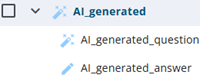
After AI question is selected, three nodes are automatically generated: an AiQuestionGroup, which serves as a placeholder; an AiQuestionHolder (suffixed with _question), which contains the generated question; and a TextArea or TextBox (suffixed with _answer), which captures the respondent’s answer.
The AiQuestionGroup
The AIQuestionGroup acts as a container for the two underlying nodes. In addition to the standard node settings, it stores the configuration and context needed to generate the AI question, such as the selected source question and the information required to generate a relevant follow-up question.
Settings
The table below lists the specific settings for AI questions, followed by the common settings shared with other node types.
| Setting | Description |
| Question type | The type of answer field to be used: TextBox or TextArea. |
| Related question text | The text of the related question. Enter a short description of the question to help generate the AI question. If a suitable question cannot be generated, this text is displayed instead. |
| Select node | The related node on which the AI-generated question is based. The related question must appear on a previous page. |
| Maximum length answer related question | The maximum number of characters allowed in the answer to the related question. If the answer exceeds this limit, no AI question is generated. |
| Context | Additional context used when generating the AI question. |
| Skip on related answers | The answers for which no AI question should be generated. |
 | Basic settings Learn more about the basic settings of a node. |
 | Conditions Learn how to add conditions to nodes. |
 | Translations Read more about adding translations. |
The AiQuestionHolder
The AiQuestionHolder is automatically created with the suffix _question. It contains additional information about the generated question and its context. It also ensures that the AI-generated questions, including the generated question text, are included in the export.
This node has only a Basic settings panel, which contains the Node name, Node type, and Text settings.
The anwer question
The answer node is either a TextBox or a TextArea. It behaves like any other TextBox or TextArea, except that it does not have a Text setting. The text is generated by AI and is displayed only on screen.