



The DESAN questionnaire software is made up of several interconnected components that support the creation, management, and analysis of questionnaires. This page introduces these components and provides links to get started quickly.
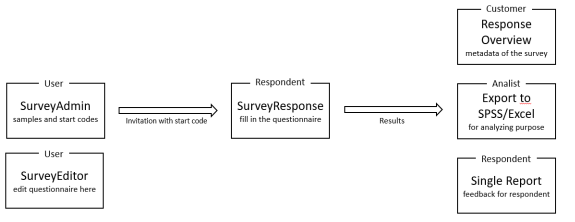
The image below illustrates how the main components are connected, followed by a table that lists the individual parts and their functions. For several components, links to Getting Started articles are included for further guidance.
| Component | Description |
| Projects portal | This screen is shown after logging in and displays all projects in the system. Each project contains one questionnaire and may include reports and samples. From this screen, questionnaires, samples, and project actions can be accessed, while the left-hand menu provides access to user management and other features. Read more |
| Survey Response | The Survey Response part is what the respondents use. After logging in with a start code they can fill in the questionnaire. Read more |
| Survey Editor | The Survey Editor is the most important part of the application. Besides managing the questions, the user can also manage translations and change the layout of the questionnaire. Getting started |
| Survey Admin | Creating start codes, managing samples and variables, creating e-mail templates, inviting respondents and creating SPSS files for analysis are done in the Survey Admin. Getting started |
| Single Reports | A single report can be used to provide respondents with feedback after completing the questionnaire. It is also accessible to system users for creating and managing reports. Getting started |
| Response overview | Combine the data of one or more surveys – including all sample data – into overviews with graphs and tables to keep track of the status of the responses and the given answers on the questionnaire. Getting started |
| Themes | A theme defines the questionnaire and editor layout, including colours, fonts, and sizes. Changes affect users and respondents, and some themes are project-specific while others apply to all projects. Read more |
| Image & document bank | This is a collection of images and documents that can be used in the questionnaire and reports. For example, as a logo, image, privacy statement or as a link in a text. |
| User management | Users with access are managed in the user component, where roles can be assigned and invitations sent. Both internal and external users are included, with external users having limited access. |
| Jobs management | Jobs, such as daily mailing of results or synchronization of response data, can be managed here. New jobs can be added if needed, but this requires customization. |
| Mail templates | The e-mail contents for inviting users, password recovery, and more can be managed here. |
| API keys | This is advanced functionality and is outside the scope of this manual. |
| Helpdesk | In this helpdesk section, actions such as reopening cases, managing responses, or handling rewards, among others, can be performed. |