


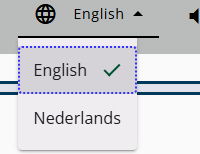
The Survey Response module allows certain values to be stored for later use. This is useful because it eliminates the need to repeatedly switch language and enables debug information to remain visible when needed.
It is also common to send the start code directly within the URL.
The following sections explain how to send specific parameters to the Survey Response.
Note: When adding parameters to the URL (such as lang=nl-NL or debug=1), the first parameter should be preceded by a ?, and any additional parameters should be preceded by &.
Debug information
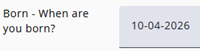
When testing the questionnaire, it can be helpful to display node names. This can be done by adding debug=1 to the URL. See also the image on the left, where the question name is Born.
Information for call center
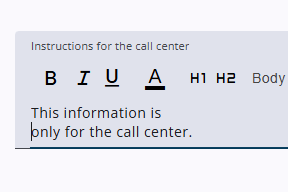
Extra information for the call center can be added in the Survey Editor and will be shown when desan_telephone=1 is added to the URL, appearing to the employee as they complete the questionnaire for the respondent.
Language
The language can also be added to the URL, for example lang=nl-NL. How this works is explained in detail here.
Start code
The start code is not a URL parameter like lang or debug, and it is not preceded by ? or &. If present, it appears directly after the GUID, which is the 36-character string of numbers, letters, and dashes.
The system reads this value and automatically fills in the start code. If the auto-login option is enabled (see the next section), the login will be completed automatically.
Auto login
If the start code is included in the URL and autologin=1 is added, the login screen is skipped and the respondent is logged in automatically.
Force visible
While navigating the questionnaire, all existing routing can be ignored by adding the parameter force-visible=1 to the URL When this parameter is used, all questions are displayed regardless of the underlying routing.