


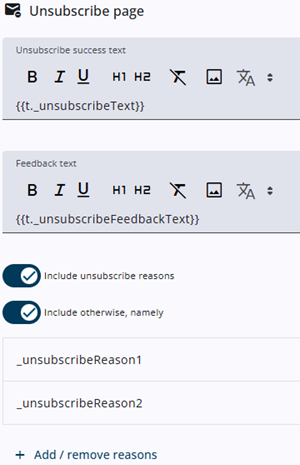
The unsubscribe page allows respondents to opt out of future emails and optionally provide a reason.
Creating the content of this page is straightforward. The left side contains the input fields, such as the page content and the heading for the list of reasons, while the right side displays a live preview.
The first toggle enables a list of predefined unsubscribe reasons, while the second adds an Other option, allowing respondents to enter a custom reason.
The displayed reason _unsubscribeReason1 is defined in the dictionary items on the Translations tab. A set of default reasons is provided automatically, and additional ones can be added if needed.
All texts, including the text on the Confirm button at the end, are fully translatable.
Adding an unsubscribe link to the invitation email
To allow respondents to unsubscribe, an unsubscribe link should be included in the invitation email. This can be presented either as a button with a clear call to action, such as Unsubscribe from this survey, or as a direct link within the email body.
In some email clients, such as Gmail, unsubscribe links are automatically recognized and displayed as an Unsubscribe button in the inbox view. This can improve the email’s reputation and reduce the likelihood of it being marked as spam.
Unsubscribe process for respondents
When a respondent clicks the unsubscribe link, they are first asked to confirm their request. This confirmation step helps prevent unintended unsubscriptions caused by automated systems such as spam filters or bots.
Once confirmed, the unsubscription is processed and the respondent receives a notification indicating that the request has been completed and the window can be closed. If the link is used again, a message will indicate that the respondent has already been unsubscribed.
It is possible that a respondent attempts to unsubscribe from a project that has already been closed. In that case, a message will be shown indicating that the project is closed. No further action will be taken and the unsubscription will not be registered. Since unsubscriptions are handled at the project level, no action is required once a project has been closed.
Importance of the unsubscribe link for email deliverability
More and more mail servers require an unsubscribe link for bulk mailings (over 500 emails). Messages without such a link are more likely to be filtered as spam or even placed on a blocklist, which can significantly affect deliverability.
Although some may assume that including an unsubscribe link reduces response rates, the opposite is often true. Emails that are not delivered, marked as spam, or flagged as phishing have a far greater negative impact than occasional unsubscribes. For this reason, it is recommended to include an unsubscribe link in all mailings to improve email reputation and maximize deliverability.