


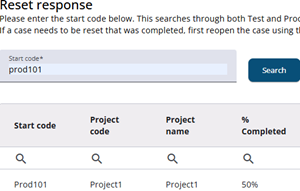
A response can be reset by entering the start code and clicking the reset icon. A popup window appears and the word RESET has to be entered to complete the reset process.
The response status is then set back to None (not started), and all previously submitted answers are permanently deleted. These answers cannot be recovered.
Any sample fields linked to the start code remain unchanged.
Resetting a response is useful when the full flow needs to be tested and then returned to its initial state.
Please note that when a response is reset, the report data used in the Response Overview module is updated accordingly.