


The Manage Reward Pools tab displays a table with all reward pools for the selected project. In addition to information on how many rewards have been claimed, each reward pool can also be adjusted, retired, or deleted.
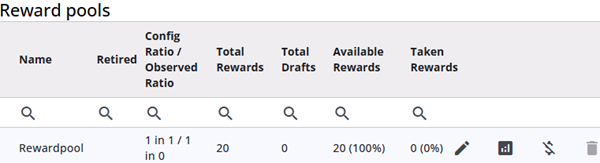
The table below explains the different columns in the table.
| Column | Description |
| Name | The name of the reward pool. |
| Retired | The date of retirement, if applicable. |
| Config Ratio/Observed Ratio | The configured ratio of the reward pool and the current observed ratio. |
| Total Rewards | The total number of rewards available to be distributed to respondents. |
| Total Drafts | The number of drafts in the reward pool. Note that not every draft results in a reward. |
| Available Rewards | The number of rewards currently available. |
| Taken Rewards | The number of rewards claimed by respondents. |
| Edit | The reward pool can be edited here. The name and ratio can be changed, and a new file with rewards can be uploaded. The current file(s) can also be removed. |
| Analytics | Opens the Analytics screen, which provides detailed information about the reward pool. The analytics are described in more detail below. |
| Retire | Retires the reward pool. Once retired, respondents can no longer receive rewards from this pool. Statistics and historical data remain available. |
| Delete | Permanently deletes the reward pool, including all associated data. |
Analytics
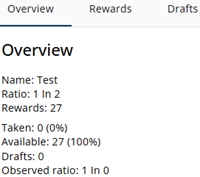
Clicking the Analytics icon opens a new window with three tabs: Overview, Rewards and Drafts.
The Overview tab displays statistics for the reward pool. Most of this information can also be found in the table described above. The Rewards tab shows the uploaded reference codes and the winning start codes. The Drafts tab lists all drafts, some of which result in a reward while others do not.