


Goto statements are used to control the routing of the questionnaire. Based on given answers or sample values, respondents are routed to a specific node and questions can be skipped then. An empty goto statement can also be used to force the start of a new page.
Settings
A Goto node has only two sections of settings: Basic Settings and Goto statements. Unlike other node types, the Basic Settings contain only the name and type, with no fields for text.
Goto statements
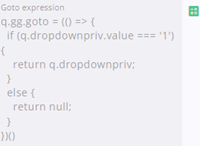
Enter the expression that determines the next routing point here, using the Query Builder or Expression Editor. If the expression returns a node, the respondent will continue at that point. If the expression returns nothing the respondent will continue to the next node in the tree. More information about expressions and the query builder can be found here.
The second part of this section allows the user to hide the Back and Next buttons when needed.
Goto nodes can conditionally hide the Next or Previous button. When Next is hidden, respondents cannot continue past the Goto, and when Previous is hidden it is not possible to return to previous questions.
This can be used, for example, to require consent to a GDPR question before proceeding.