


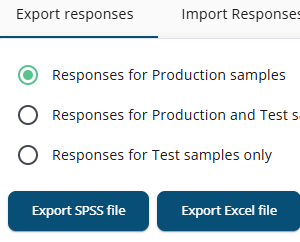
The Export Responses tab offers three options: SPSS file, Excel file, and uploaded files.
The first two options are handled similarly to exports in the Projects Portal. In Survey Admin, Production or Test samples can be selected from one project at a time. In the Projects Portal, data from multiple projects can be merged, but only Production samples can be exported.
Export SPSS/Excel
When Export SPSS file or Export Excel file is selected, a window is opened displaying the available options. Small differences exist between the SPSS and Excel exports, as well as between exports in the Survey Admin and the Projects Portal.
All these differences, options, and business rules are described in detail here.
Export uploaded files
If the questionnaire includes a File Upload option, the uploaded files can be downloaded here.