


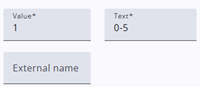
Categories are used for closed questions, such as checkbox lists and drop-down lists. In addition to the Text and Value properties, categories include several other configurable properties that control their behavior and appearance.
This document only describes the category details. Other options, such as Hide answer category text or Shuffle categories are described here. Other articles are also listed at the bottom of the page.
Category headers
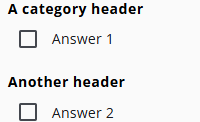
Category headers are used to organize long lists of categories. They consist only of a text property, which appears in the category list in the same position as shown in the Survey Editor. Note that the Shuffle option cannot be used with headers, and headers are not available in Range nodes.
Category properties and actions
A CheckboxList, DropDownList, MinMax, and RadioButtonList each have categories, but their properties and behavior may differ. For example,a CheckboxList allows multiple selections; however, in some cases, certain answer options cannot be combined with others.
| Property | Description |
| Value | The value of the category, typically 1, 2, 3, etc. |
| Text | The text visible to respondents. This can also be translated via the Translations tab of the questionnaire. |
| External name | The value that appears in exports. Respondents do not see this value. |
| Allow shuffle | When enabled, the item is included in the shuffling; otherwise, its position is retained. |
| User missing | Useful for analyzing data. If a question has no answer, it can be because the respondent did not see it or did not answer. User missing answers are assigned a special value (currently -99 in SPSS exports). Enabling the User missing toggle treats this answer like an unanswered question, and it will be visible as such in SPSS. |
| Add additional information | Enabling this toggle allows adding extra information to the category, visible under an i icon. |
| Info text | The extra information to be displayed. |
| Select info position | Determines whether the i icon appears before or after the label text. |
| Uncombinable with others | In a CheckboxList, multiple answers can usually be selected. Enabling this toggle prevents this category from being selected together with others. If another option is already chosen, this one will be disabled. |
| Other question | Some choices require additional input, such as “Otherwise.” Enabling this option displays an extra question to collect further information from the respondent. |
| Remove categorie | Clicking this icon removes the category from the list. |
| Move categorie | Click and hold this icon to drag the category to another position in the list. |
Categories
The articles listed below provide more detailed explanations and practical guidance on working with categories and configuring them effectively.
 | Closed question settings Read more about the closed question settings. |
 | Adding categories Adding categories, e.g., with the Category builder. |