


Categories can be added in two ways: by clicking the Add category button, or by clicking Add categories to open the Category Builder. This article provides detailed instructions for both methods.
Add category
Clicking the Add category button—located above or below the category list—adds an empty category row at the top or bottom of the list. The text can be entered directly, and the automatically assigned value, like other properties, can be adjusted.
Add categories with the Category builder
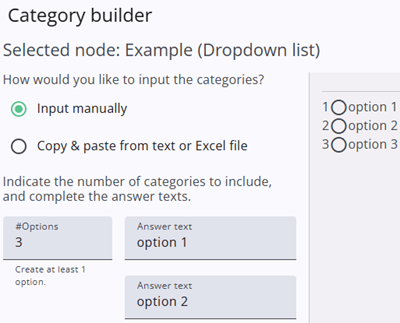
The Category builder is a tool for quickly adding categories to a closed question. Categories can be added manually or by copying them from a text or Excel file. See also the image on the left for reference.
When added manually, the user specifies the number of options, and the corresponding input fields are automatically generated. This makes it easy to enter category texts, while the values are created automatically.
When copying from a file, a text area opens where the content can be pasted. Values can also be entered manually in this area if needed.
The preview pane on the right displays the nodes of the closed question, providing a clear visual overview of its structure. The Category Builder can also be used when categories already exist, in which case the existing categories are shown in the preview pane.
Categories
The articles listed below provide more detailed explanations and practical guidance on working with categories and configuring them effectively.
 | Closed question settings Read more about the closed question settings. |
 | Category details Read more about categories and how to add these. |