


A Range is a more advanced question type that allows questions to be grouped both vertically and horizontally. This makes it especially useful for surveys where multiple questions share the same set of possible answers.
Example
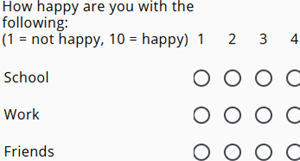
A range question can be used for topics such as satisfaction measured on a scale from 1 to 10, for example customer support, product quality, or delivery time.
In this setup, the questions are listed vertically while the possible answers (for example 1–10) are displayed horizontally.
Display on screen
On larger screens, such as desktop computers, all questions and answer options in the range can be displayed together in a grid layout on a single page. This allows respondents to quickly compare and answer multiple related questions.
On smaller screens, such as mobile devices, the questions in the range are automatically split across multiple pages to ensure better readability and usability. However, this behavior can be overridden by enabling the Display as a single page on mobile option, which forces the full grid to remain on one page even on smaller devices.
Type of grids
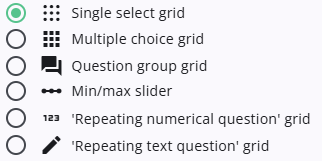
There are two types of grid available. he articles listed below the table provide more detailed explanations and practical guidance about the different grids.
Normal grids
These are standard grid layouts where each question is shown once, with answer options displayed in a grid: one row per question and one column per answer option.
 | Single select grid Read more about the single select grid. |
 | Multiple choice grid Learn about the Multiple choice grid. |
 | Question group grid Read more about how to use a Question group grid. |
 | Min/max slider grid More information about a min/max grid. |
Repeating grids
These options are useful when repeating grids are needed and question text depends on sample or constant values (e.g. locations).
 | ‘Repeating numerical question’ grid About the ‘Repeating numerical question’. |
 | ‘Repeating text question’ grid More about the ‘Repeating text question’. |
Range settings
All available grid types use the same set of configurable settings. Click on the link below to access these.
 | Range settings Learn more about the basic settings of a range. |