



The functionality for generating random responses (dummy data) is available for testing and validation purposes. It is used to simulate realistic data and to verify questionnaire logic, routing, and validations.
Step 1: Preparations
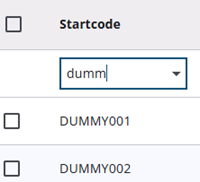
Before the generator can be used, the samples must be created with type Test. This ensures that production data is not affected and allows automatic cleanup. Startcodes are required to begin with DUMMY (case-sensitive).
It should be noted that up to 50,000 samples can be processed in a single run, and all generated data is automatically deleted 30 days after the last run.
Step 2: Uploading samples
After the Test samples are imported into the Survey Admin, the validation process can be easily started by clicking the Validation icon in the Survey Editor.
Step 3: Start proces
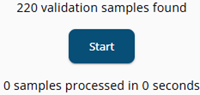
After the Validation icon is pressed, a window is opened, and the generation process can be started by clicking Start. It should be noted that access to the generator is automatically verified to ensure it is used only within the secure editor environment.
Step 4: Processing
Samples are processed sequentially in the browser using the latest published version of the questionnaire. All routing logic, validations, and limit values are applied. Mandatory questions are always completed, while non-mandatory questions are left empty in approximately 10% of cases. Processing time depends on the questionnaire’s complexity and system performance.
Step 5: Exporting and analyzing
Once processing is complete, the generated data can be exported from the survey administration screen. Only test samples should be selected for export. The exported data can then be used for validation, pilot analysis, or preparing syntax.
Each run produces new random data, so identical reruns are not possible. The generator can be safely used without affecting production environments, and all configured routing rules are automatically respected.