


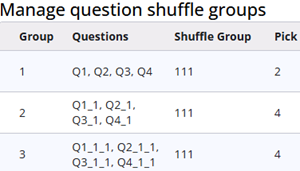
Question shuffle groups can be used to randomize groups of questions, helping to reduce biased responses.
When similar questions are grouped into different groups, those groups can be shuffled in the same way.
This article explains how to set up a shuffle group and describes situations in which shuffle groups should not be used.
Add/edit a shuffle group
A window with input fields appears when Add question shuffle group or the edit icon is clicked. No name field is available, as each shuffle group is automatically assigned a number.
| Property | Description |
| Shuffle group | Groups with the same value in this field will be shuffled uniformly. If uniform shuffling is not required, ensure that this value is unique across all shuffle groups. |
| Select nodes | Select the nodes that should be included in this shuffle group. Note that only questions within a Group and questions directly under the root can be selected. |
| Selected | Show the selected questions. |
| Pick | Pick determines the amount of questions from this group that are asked to the respondent. |
System missing
If a question is not shown due to the Pick value, the respondent has not had the opportunity to answer it. In exports, the question will be recorded as System missing.
Heads up
Questions that are part of a QuestionGroup cannot be selected for inclusion in a shuffle group.
Avoid adding questions to shuffle groups when they depend on answers to previous questions. If the order of the questions changes, respondents may not have had the opportunity to answer the required preceding question.
When using the Pick value option in a shuffle group, ensure that none of the questions in the group are referenced in scripts, as some questions may not be shown to the respondent.
Routing between questions within the same shuffle group should be avoided, as this may lead to unexpected results.