


The Download samples and Upload samples buttons provide a simple way to update report variables. Once a survey is complete and metrics such as totals and averages have been calculated, it can be helpful to include these in the samples.
This allows respondents to compare their own results with those of others, adding valuable context to their scores.
Download samples
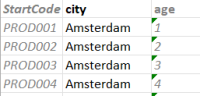
Press this button to download the samples. The Excel file contains all sample values, with report variables highlighted in bold. Values that are not intended to be modified are displayed in grey and italic for easy distinction.
Please note that only Production samples are included in the downloaded file.
Upload samples
After the report variables in the Excel file have been updated, the file can be uploaded to apply the changes. The updated report variables will then be immediately available to respondents.