


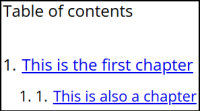
Select Chapter as the node type when chapters are needed for better organization, and optionally, for a table of contents. This node type does not display any answers; its only purpose is to structure the report
Settings
Several properties, such as Name and Text, are common to all node types. A detailed article describing these common settings can be found at the end. The remaining settings are described below.
| Setting | Description |
| Show in table of contents | When enabled, the chapter will be shown in the table of contents. |
| Force new page | When enabled, the chapter starts at a new page. |
| Chapter | The text displayed as the chapter heading. |
| Select chapter level | Choose the chapter level: h2, h3, or h4. When included in the table of contents, h2 chapters appear as main titles (for example, 1. Title), while h3 chapters appear as indented subtitles (for example, 1.1. Subtitle). |
Other settings
Click the link below to explore these settings.
 | Common settings Learn more about the common settings of a node. |