


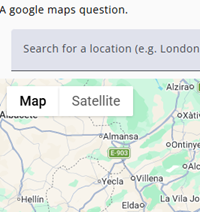
Select GoogleMaps as the node type when the respondent needs to enter either an area, a city or an address.
The location can be entered in two ways: either by selecting it from the dropdown menu (shown above the map in the image on the left) or by clicking directly on the map. Both methods allow the desired location to be specified easily. This works in a similar way to searching for an address or region in Google Maps, making the process intuitive and straightforward.
Settings
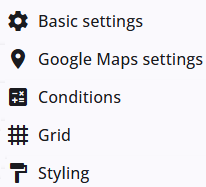
A GoogleMaps node includes several common settings that are shared across most other node types, providing consistent functionality and configuration options.
The specific Google Maps settings are described in the following section, and detailed information about the common settings can be found below.
Google Maps settings
In addition to the common settings, the Google Maps node also includes specific settings.
| Property | Description |
| Default location | The default map location. This will be used as the center of the map, but it does not restrict where respondents can place their answers. |
| Zoom | Enter the default zoom level for the map, ranging from 5 (large countries or regions) to 21 (street or building level). |
| Sample variable | The default location can also be defined by providing a sample value. If a value is supplied and is able to be resolved by Google Maps, it will take precedence over the default location. |
| Enable support for four-digit Dutch postal codes | Dutch postal codes consist of four digits, which are not supported by Google Maps by default. |
| Search area | Choose between world wide and Europe. |
Other settings
Click the links below to explore these settings. The Tags and Trigger tabs are not included here, as they provide advanced functionality and are outside the scope of this guide.
 | Basic settings Learn more about the basic settings of a node. |
 | Conditions Learn how to add conditions to nodes. |
 | Grid Read more about the column layout, breakppoints, and more. |
 | Styling Discover how to style the node. |
 | Validations Read more about how to add validations. |
 | Translations Read more about adding translations. |