


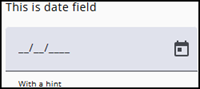
The Date node type should be selected when a date value is required from the respondent, such as date of birth.
A date picker makes it easier to pick the required date.
Settings
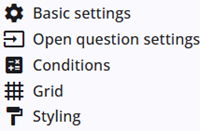
A Date node includes several common settings that are shared across most other node types, providing consistent functionality and configuration options.
The specific Date settings are described in the following section, and detailed information about the common settings can be found below.
Open question settings
In addition to the common settings, the Date node also includes specific settings.
| Setting | Description |
| Minimum and maximum date | Set the minimum and maximum dates available in the date picker. Dates outside this range can still be entered manually. |
| Hint | Adds a small hint text below the text area to provide additional information to the respondent. |
Other settings
Click the links below to explore these settings. The Tags and Trigger tabs are not included here, as they provide advanced functionality and are outside the scope of this guide.
 | Basic settings Learn more about the basic settings of a node. |
 | Conditions Learn how to add conditions to nodes. |
 | Grid Read more about the column layout, breakppoints, and more. |
 | Styling Discover how to style the node. |
 | Validations Read more about how to add validations. |
 | Translations Read more about adding translations. |