


The second tab of the Edit project window contains the project settings. A range of settings is available for each project, such as the end date and default email addresses. These settings are described in the table below.
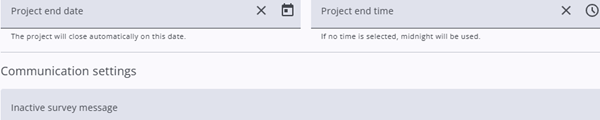
| Setting | Description |
| Project end date & end time | The project is automatically closed at the specified date and time. If no time is provided, 12:00 AM is used (meaning the specified day is not included). |
| Communication settings | |
| Inactive survey message | The message displayed to respondents when the survey is inactive or closed. |
| Sender e-mail address | The default sender email address can be overridden. If left empty, the system default is used. |
| Sender name | The display name of the default email sender can be overridden. If left empty, the system default is used. |
| SMS sender name | The display name of the default SMS sender can be overridden. If left empty, the system default is used. |
| Project settings | |
| Make the survey editor read-only | When enabled, the project is set to read-only. The questionnaire cannot be edited by any user, including administrators. |
| Allow responses to be completed automatically | Responses are automatically completed if the finish page has been reached but the questionnaire was not submitted, and no changes have been made for 24 hours. |
| Set this project as a group project | When enabled, the project is designated as a parent project and can be assigned as a parent to other projects within a group. |
| Parent group project | If the project is part of a group, the parent project can be selected here. |
Grouped projects
A parent project can be used as a common entry point for multiple related projects. The URL of the parent project, including a start code, can be distributed to respondents. After the start code has been entered, the respondent is automatically redirected to the appropriate child questionnaire.
This setup is particularly useful when a shared entry point is required, while different layouts or content must be presented later in the questionnaire. For example, a nationwide survey for a large organization may be structured so that each location has its own questionnaire, with a distinct layout and region-specific questions. In such cases, a general layout can be applied to the parent project, while each child project can contain its own customized questionnaire.
It should be noted that parent projects within a group do not have start codes. Start codes and samples are only assigned to the child projects.
Before samples are added, all parent and child relationships must be defined. This is required because the system validates that start codes are unique across all child projects. If duplicate start codes were allowed, the parent project would not be able to determine to which child project a respondent should be redirect