


Report nodes share a number of common settings, which are described below.
The first settings always appear at the start of the list of settings. The last two settings appear toward the end of the node’s settings list.
| Setting | Description |
| At the top | |
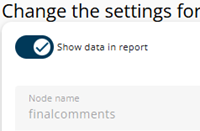
| Show data in report | Disabling this toggle hides the node in the report. This setting cannot be overridden by the Show conditionally toggle, although the reverse is possible. Above the node tree there is an option to hide nodes for which this toggle is disabled. More information about these options can be found here. |
| Node name | The name of the node. By default, it is inherited from the questionnaire but can be overridden. Note that if the name is changed and the report is synchronized with the questionnaire, the node with the original name will reappear because the renamed node no longer matches the questionnaire node. |
| (Question) text | The original text from the questionnaire at the time the report was created. This text will not change when the report is synchronized with the questionnaire. The text can be overridden here using the rich text editor. |
| Width | The width of the displayed text. |
| At the bottom | |
| Show conditionally | Determines whether the node is shown by evaluating an expression. If Show data in report is disabled, the node will never appear. |
| Set as default | The documentation of this feature is currently under construction. |