


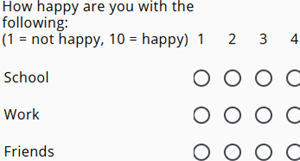
A single-select grid is a clear and efficient way to collect ratings across multiple related questions in one structured view.
Each row represents a topic, and respondents can select only one score per row using radio buttons—hence the name single-select grid.
In this layout, the questions are listed vertically, while the possible answers (for example, 1–10) are displayed horizontally.
For example, a numeric scale can be used for questions such as: “How happy are you on a scale from 1 to 10 with…”, followed by topics like school, work, friends, etc.
The construction of a single-select grid involves a few steps, which are described below.
A Range node is automatically created when the type of grid is selected. If the setup is canceled, the node can be removed by pressing Cancel and Remove.
Step 1: The columns

The columns in the grid represent the possible answers to each question, such as a score from 1 to 10. Answers can be entered manually or quickly added using the copy-paste option.
Step 2: The rows
The rows in the grid are the different questions, each row corresponds to a question text. And the different questions can be entered manually or copy pasted.
Step 3: Basename
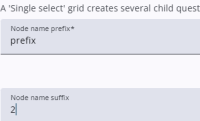
A single-select grid automatically creates child nodes, and their naming can be configured here. The prefix defines the base of each child node, while the suffix determines the final part of the name. In this example, the first child would be named prefix2 and the second prefix3.
It is also possible to use letters instead of numbers for sequencing, such as a, b, and c.
The result
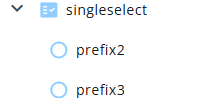
The result is a Range node with RadiobuttonList nodes as its children. The categories for these lists are managed at the first child level, ensuring that all child nodes share the same set of response options for consistency.