


This article describes three things: how to switch to another report, how to add a new report, and how to delete a report.
Switch report
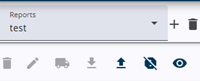
To switch to another report within the same project, open the dropdown and select the desired report. The dropdown displays the current report.
Add a new report
To add a new report, click the + icon next to the dropdown. A window will open asking for the report name. Enter a valid name and click Confirm. The report will then be added.
Delete a report
To delete a report, just click the rubbish bin icon. A dialog will appear requesting confirmation of the deletion. After confirmation, the report will be removed.