


Closed questions offer a limited set of answers, such as a checkbox list. Many of their properties are similar to open questions, but closed questions also include categories to organize the options.
This article describes the main properties of closed questions and how to work with their categories effectively.
Settings
Several properties, such as Name and Text, are common to all node types. A detailed article describing these common settings can be found at the end. The remaining settings are described below.
| Setting | Description |
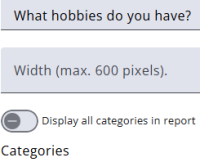
| Display all categories in report | When enabled, the full list of categories is displayed, and the chosen answer(s) are highlighted. |
| Categories | Values and texts are initially copied from the questionnaire and can be overwritten here. |
| When no answer has been given | One of the following is applied: the question is hidden, the question label and custom text are displayed, only the label is displayed, or only the custom text is displayed. The standard message for no answer can be edited in the Translations tab under the “Manage translations” chapter. |
| Show answers in oval layout | When enabled, answers are displayed inside an oval with a background colour and a border colour. |
| Left column / right column | The screen is divided into 12 equal columns. Column widths determine the placement of questions and answers, for example, 8 + 4 for two columns or 12 + 12 for answers below the question. |
| Indent answer | When enabled, answers are indented. Answers may appear below the question text when indentation is applied. |
Other settings
Click the link below to explore these settings.
 | Common settings Learn more about the common settings of a node. |