


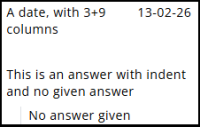
Date, Number, TextArea and TextBox nodes all work in the same way.
These four question types display answers in a straightforward way and share the same properties.
Settings
Several properties, such as Name and Text, are common to all node types. A detailed article describing these common settings can be found at the end. The remaining settings are described below.
| Setting | Description |
| When no answer has been given | Determines how the question is displayed when no answer has been provided. The default message can be edited in the Translations tab under Manage translations. |
| Show answers in an oval layout | Answers are shown inside an oval with a background colour and a border colour |
| Left column/right column | The available space is divided into 12 units for the question text and the answer. For example, 8 + 4 creates two columns, with the question text taking 8 units and the answer 4, while 12 + 12 places the answer below the question. |
| Indent answer | The answer is displayed with a small indent, which is especially useful when the question and answer are placed underneath each other. |
Other settings
Click the link below to explore these settings.
 | Common settings Learn more about the common settings of a node. |