


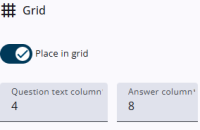
By default, the question and its input field(s) are arranged within a 12-column grid. This tab provides the option to disable the grid, as well as to configure its layout when it is enabled.
Most of these settings are straightforward, and guidance is also provided through help texts in the Survey Editor.
Settings
The table below lists all available options, along with brief descriptions.
| Setting | Description |
| Place in grid | Turning off the grid merges the question and answer columns into a single full-width column. |
| Question text column/Answer column | The grid of a questionnaire has a maximum width of 12 columns. They are divided into a question column and an answer column. Each column must have a value between 1 and 12. |
| Select breakpoint | The breakpoint sets the screen width at which the question and answer switch from horizontal to vertical. When the width is below the chosen value, they are stacked vertically. |
| Question text position with regards to the answer | Determines the position of the question relative to the answer in the grid. Floating means the question text is placed inside the input field. |